Config changes to the openwrt to make it work:
problem:
pachube did not recognize my xml file as xml
solution:
create a /etc/httpd.conf file with this line:
.xml:application/xml
problem:
need to start at boot time the process that reads from serial port
solution:
follow this tutorial: http://oldwiki.openwrt.org/CustomStartupScripts.html
problem:
enable cron
solution:
follow this tutorial: http://oldwiki.openwrt.org/HowtoEnableCron.html
Sunday, May 10, 2009
Saturday, May 9, 2009
Pachube rules
The whole Pachube concept is amazing, so many cool things made so simple! (...well, some of them not simple enough for me...)
The pachube feed is on. I have been struggling for a while with the xml system of putting data to the pachube site, finally decided to track back and start with the more simple csv system. And so this very simple sh script is uploading the temperature every 300 seconds:
#!/bin/sh
while [ 1 ]
do
temp=$(grep -m 1 "temp" /dev/ttyS0|cut -d "=" -f 2)
curl --request PUT --header "X-PachubeApiKey: your-key-here" --data "$temp" "http://www.pachube.com/api/1931.csv"
sleep 300
done
This is an example of the very cool things you can find in the Pachube site:
The pachube feed is on. I have been struggling for a while with the xml system of putting data to the pachube site, finally decided to track back and start with the more simple csv system. And so this very simple sh script is uploading the temperature every 300 seconds:
#!/bin/sh
while [ 1 ]
do
temp=$(grep -m 1 "temp" /dev/ttyS0|cut -d "=" -f 2)
curl --request PUT --header "X-PachubeApiKey: your-key-here" --data "$temp" "http://www.pachube.com/api/1931.csv"
sleep 300
done
This is an example of the very cool things you can find in the Pachube site:
Friday, May 8, 2009
The temperature sensor
I have soldered the DS18S20 sensor to a cat5 cable, inserted the sensor in a small plastic bottle and sealed everything with silicone. Ugly, uh?
After doing it I thought I should have filled the bottle with some stuff that is not electricity conductive but conduces heat... Something like vaseline might work... need to Google a bit for this. For now the silicone needs to dry up.
Also decided to use perl instead of php, I am more familiar with it and took me no time to set-up a script to read the serial port and write a html file:
(will paste the code when I can figure how to make the blog ignore the html code embedded)
#!/usr/bin/perl -w -I /usr/lib/perl5/5.10/CGI
open( SERIE, "/dev/ttyS0" ) or die "no abre serie";
while ( <SERIE> ) {
if( ($temp) = /(d+.d+)/ ) {
$date = `date '+%d-%h %H:%M'`;
open( OUT, ">/www/lwa/index.html" ) or die "no abre index.html";
print OUT "<html>
<body>
<h1>Temperatura del agua</h1>
<p>Temperatura del agua a las $date: $temp C</p>
</body>
</html>n";
close OUT;
}
# sleep 5;
}
close SERIE;
This is the page: http://cebollino.homelinux.com/lwa/
And just heard about Pachube! This is an amazing site where you can send input from sensors, store the data, get graphs.... Waiting for my key to upload data.
Saturday, May 2, 2009
The prototype
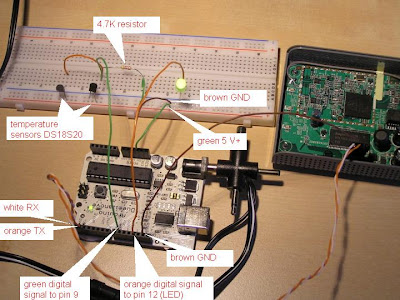
The prototype is ready, this is the picture:

The LED will light if temperature in sensor 2 goes above a set limit. You can also switch on and off the led from the fonera, sending an I or an X :
root@OpenWrt:/usr/bin# echo I > /dev/ttyS0
The Fonera is the 2200 version, I installed openwrt kamikaze:
root@OpenWrt:~# uname -a Linux OpenWrt 2.6.26.5 #21 Sat Feb 14 23:12:28 CET 2009 mips unknown
The serial connection was giving me trouble, as openwrt uses the only Fonera serial port for console, so the login prompt was interfering Finally found how to disable the login prompt at the serial console:
root@OpenWrt:~# cat /etc/inittab
::sysinit:/etc/init.d/rcS S boot
::shutdown:/etc/init.d/rcS K stop
tts/0::askfirst:/bin/ash --login
# disable login in console to release serial port
#ttyS0::askfirst:/bin/ash --login
tty1::askfirst:/bin/ash --login

and this is the Arduino program.
This is how the output looks:
root@OpenWrt:/usr/bin# cat /dev/ttyS0
1 temp_c=22.00
2 temp_c=22.00
Led OFF
1 temp_c=22.00
2 temp_c=22.00
Led OFF
This is how the output looks:
root@OpenWrt:/usr/bin# cat /dev/ttyS0
1 temp_c=22.00
2 temp_c=22.00
Led OFF
1 temp_c=22.00
2 temp_c=22.00
Led OFF
The LED will light if temperature in sensor 2 goes above a set limit. You can also switch on and off the led from the fonera, sending an I or an X :
root@OpenWrt:/usr/bin# echo I > /dev/ttyS0
The Fonera is the 2200 version, I installed openwrt kamikaze:
root@OpenWrt:~# uname -a Linux OpenWrt 2.6.26.5 #21 Sat Feb 14 23:12:28 CET 2009 mips unknown
The serial connection was giving me trouble, as openwrt uses the only Fonera serial port for console, so the login prompt was interfering Finally found how to disable the login prompt at the serial console:
root@OpenWrt:~# cat /etc/inittab
::sysinit:/etc/init.d/rcS S boot
::shutdown:/etc/init.d/rcS K stop
tts/0::askfirst:/bin/ash --login
# disable login in console to release serial port
#ttyS0::askfirst:/bin/ash --login
tty1::askfirst:/bin/ash --login
Friday, May 1, 2009
The Goal
The purpose of this blog is to document the progress of my project to track the solar warming of the swimming pool.
The solar panel is a very basic black plastic panel connected to the swimming pool filter circuit. So when the water is filtering, a portion of it is bypassed through the solar panel, warmed by the sun, and returned to the swimming pool.
I want to do this:
I will use an Arduino duemilanove to control everything. The Arduino will be connected to a Fonera wi-fi router via serial port. The temperature sensors will be 1-wire sensors DS18S20. The data will be logged to a remote mysql database.
The wind speed will eventually come from the AAG 1-wire weather station. The control page will be programmed with PHP and will run in the Fonera.
The solar panel is a very basic black plastic panel connected to the swimming pool filter circuit. So when the water is filtering, a portion of it is bypassed through the solar panel, warmed by the sun, and returned to the swimming pool.
I want to do this:
- measure and record the initial water temperature
- measure and record the water temperature after going through the solar panel
- visualize everything in the internet, and display graphs
- if the temperature after warming is lower than a set limit, close the warming circuit by operating an electrovalve with Arduino
- ability to change the temperature limit from the internet
- abilit to close the circuit manually from the internet
- record the weather temperature and wind speed, to track the cooling effect of wind and nights
- record the water flow with a flowmeter (need to find one that can be read from Arduino)
- build a sensor to measure water movement and record usage hours of pool, and eventually take an action on that
I will use an Arduino duemilanove to control everything. The Arduino will be connected to a Fonera wi-fi router via serial port. The temperature sensors will be 1-wire sensors DS18S20. The data will be logged to a remote mysql database.
The wind speed will eventually come from the AAG 1-wire weather station. The control page will be programmed with PHP and will run in the Fonera.
Subscribe to:
Posts (Atom)